Case Studies

Real results from real transformations

Discover how we've helped leading organizations achieve breakthrough results through AI, automation, and innovative technology solutions.

100+

Projects Completed

98%

Client Satisfaction

$40M+

Client Cost Savings

5+

Years Experience

Logistics Financial Automation

AI-Powered Invoice Processing Case Study – Freight Forwarding Industry

Eliminating manual data entry, processing errors, and overpayments via touchless Tally ERP ledger integration.

Logistics Profile

Company Type
Freight Forwarding Agency
Target System ERP
Tally ERP

1,500
Invoices / Month
47
Suppliers
27
Fields Extracted
99%
Accuracy

Accounts Payable Challenges

The finance department spent an excessive amount of manual effort processing incoming supplier payloads, leading to significant transactional friction, processing errors, and ongoing financial leakage.

20% Entry Error Rates

Manual data typing across files consistently drove clerical errors, adding massive verification cycles.

5% Invoice Overpayments

Lack of validation safeguards caused direct overpayments, triggering vendor disputes and cash flow drains.

Slow Posting Turnaround

Sluggish manual posting lines tied down staff attention, delaying crucial vendor dispute resolutions.

Operational AP Fatigue

Repetitive invoice keying generated high team fatigue and severely degraded absolute office productivity.

The Intelligent Accounts Payable Workflow Blueprint

STAGE 01

Monitor & Extract

Monitors shared directory nodes autonomously, parsing 27 critical business fields via multi-model extraction engines.

STAGE 02

Screen & HITL Verify

Flags low-confidence scores straight to Human-in-the-Loop paths while continuously screening for duplicate or tax anomalies.

STAGE 03

Dispute & ERP Post

Proactively checks vendor disputes to alert Sales/Ops before pushing fully touchless payloads straight into Tally ERP.

STAGE 04

Governance Audit

Supplies live operations dashboards, system logs, role permissions, and zero-code field extraction adjustments.

AI Assistant Queries Enabled: Business teams can interactively fetch context variables by asking the integrated conversational bot: "Which invoices are pending?", "Why was Invoice #123 flagged?", or "Show invoices from Supplier X."

Quantified Business Efficiency Outcomes

Metric Component Automation Metric Operational Impact Analysis
Invoice Processing Speed 20 Seconds / Invoice Drastically scales document ingestion times down from legacy hourly lags.
End-to-End Cycle Time 1–2 Minutes Total background execution path from file monitoring directly to net clearance.
Data Extraction Accuracy 99% Accuracy Target Intercepts and maps text elements accurately to stop the 20% manual error rate.
ERP Posting Pipeline Fully Touchless (Tally) Direct programmatic payload serialization bypasses traditional interface entries.
Vendor Dispute Volume 70% Absolute Reduction Proactive discrepancy screening eliminates lingering dispute cycles.
Shifted Internal Staff Focus Strategic Value Execution Finance experts shifted focus from data entry tasks to exceptions and vendor management.
Corporate Financial Control Maximized Protection Reduces standard duplicate overpayments, optimizes cash flow, and stops margins leakage.

Macro Business Impact

By deploying specialized AI Agents, the logistics organization successfully shifted invoice processing from a slow, manual activity into a centralized source of truth. Instead of losing operational hours keys-deep in accounting ledgers, financial controllers are now fully equipped to audit exception alerts, maximize cash flow safety margins, and strengthen primary supply chain networks.

The underlying automation doesn't replace financial domain specialists—it cleanly isolates and wipes out repetitive typing cycles so they can dedicate attention to higher-value corporate choices and robust governance compliance.

"AI doesn't replace finance professionals—it eliminates repetitive work so they can focus on higher-value decisions."

Legal Operations Automation

AI-Powered Contract Repository & Intelligence

Transitioning multi-university and multi-region contract storage blocks into a centralized, predictive lifecycle source of truth.

Customer Profile

Company
Education BPO & Managed Services Provider
Industry Sector
Higher Education Support Services

766
Contracts Managed
142
Active Clients
27
Global Regions
6,570
Total Pages
60 Business Fields Extracted Automatically

Business Challenges

Managing extensive compliance profiles across multiple universities, distinct clients, and various country legal systems generated high version confusion and friction under legacy manual storage setups.

Excel Sheets Fragmentation

Contract data maintained across isolated tracking sheets made system auditing and corporate metrics overview exceptionally slow.

Broken Agreement Lineage

No relation maps grouped Master Agreements with active Supplements, Amendments, and Renewals, hiding historical tracks.

Active Revenue Leakage

Operations teams unknowingly handled tasks on expired agreements, triggering direct leakage lines and severe compliance risks.

Manual Retrieval Waste

Legal and Ops professionals spent significant time manually digging through shared directories and files to confirm terms.

Zero Center Visibility: Leadership entirely lacked centralized dashboard views over active vs. inactive statuses, regional distributions, or service-wise commitment bounds.

The Contract Intelligence Agent Workflow Architecture

01 / Monitor & Extract

Autonomous Ingestion

Monitors target folders to auto-extract 60 fields instantly. Requires only a directory handshake—no manual document uploads needed.

02 / Linage & Taxonomy

Family Tree Linking

Links Master Agreements, Supplements, and Renewals while grouping entities accurately by category (Client, Vendor, Consultant, Third Party).

03 / Governance & Chat

Clause Risk & Query Checks

Parses key clauses (Liability, Notice, Payments), assigns risk tiers (Low, Med, High), and powers instant conversational natural language queries.

System Flexibility Guardrails: Mismatches trigger autonomous routing into Human-in-the-Loop review desks. Business operators retain capability to map new custom data tracking fields instantly without writing any code lines.

Quantified Business Benefits

Key Performance Indicator Agent Benchmark Result Operational Impact Realized
Contract Processing Time 30–60 Seconds Autonomous file classification and index field mapping.
End-to-End Cycle Time 2–3 Minutes Complete data enrichment lifecycle from directory drop to clean tracking dashboard.
Data Extraction Accuracy 99% Accuracy Target Eliminates manual input variances across multi-page legal documents.
Contract Search Time 20 Seconds Natural language query chatbot bypasses hours of server directory hunting.
Renewal Success Rate 99% Enforced Success Automated operation triggers initiate renewal workflows prior to expiry dates.
Centralized Global Visibility 99% Visibility Level Real-time macro view over region-wise contract metrics and service lines.
Cross-Team Collaboration Single Shared Ledger Unifies information access securely across Sales, Finance, Operations, and Legal.
Revenue Protection & Risk Maximized Control Early identification of high-risk terms to permanently block margin leaks.

Business Impact Summary

The AI-powered Contract Repository transformed contract management from a fragmented, manual process into a centralized source of truth. By automatically organizing, classifying, linking, and monitoring agreements, the organization unlocked complete governance across 766 contracts spanning 142 clients and 27 regions.

Instead of spending hours searching through manual folders or disconnected tracking sheets, business users can now retrieve structural contract criteria in seconds, track renewals proactively, and isolate operational risks before they impact margins. The result delivers faster decision-making capability, standardized compliance execution, and permanent prevention of regulatory exposure.

"From Contract Storage to Contract Intelligence—AI that doesn't just find contracts, but understands, links, monitors, and protects them."

Supply Chain Intelligence

AI-Powered Invoice Processing & Customs Automation

Automating multi-line item invoice extraction and HS code consolidation to enable touchless customs readiness.

Customer Profile

Company
Shopping Mall
Target System
Customs Application

100
Invoices / Mo
150
Avg Line Items
25
Pages / Inv
29
Suppliers
5,900 Items Processed with HS Codes

Business Challenges

The shopping mall faced significant difficulties managing import product data, particularly due to high line-item volumes and complex HS code mapping requirements.

High Error Rates

Manual extraction and entry caused a 30% invoice processing error rate.

HS Code Complexity

Consolidating HS Codes manually across thousands of items was time-consuming and error-prone.

Operational Delays

Large invoice sizes (25 pages/150 items) increased processing time and delayed import clearance.

Repetitive Admin Work

Employees spent hours performing manual data entry instead of supporting core business operations.

AI Agent Workflow

Ingestion & Extraction

Continuously monitors shared drives to automatically upload invoices and extract 20 business-critical fields.

Enrichment & Consolidation

Performs item-level consolidation, product normalization, and automatically consolidates HS Codes.

Touchless Integration

Imports validated data directly into the Customs Application, with a chatbot interface for operational queries.

Business Benefits

Key Performance Indicator Result
Processing Time (150 line items) 60–120 seconds
End-to-End Cycle Time 2–3 minutes
Data Accuracy 99%
Operational Efficiency Touchless posting & Automated HS code

"From Complex Multi-Page Invoices to Touchless Customs Processing—AI that extracts, enriches, consolidates, and posts with speed and accuracy."

INPO · Financial Operations Automation

AI-Powered Invoice Processing & ERP Automation

Automating invoice extraction, validation, 3-way matching, approval workflows and ERP posting through seamless integration with Microsoft Dynamics 365 Business Central.

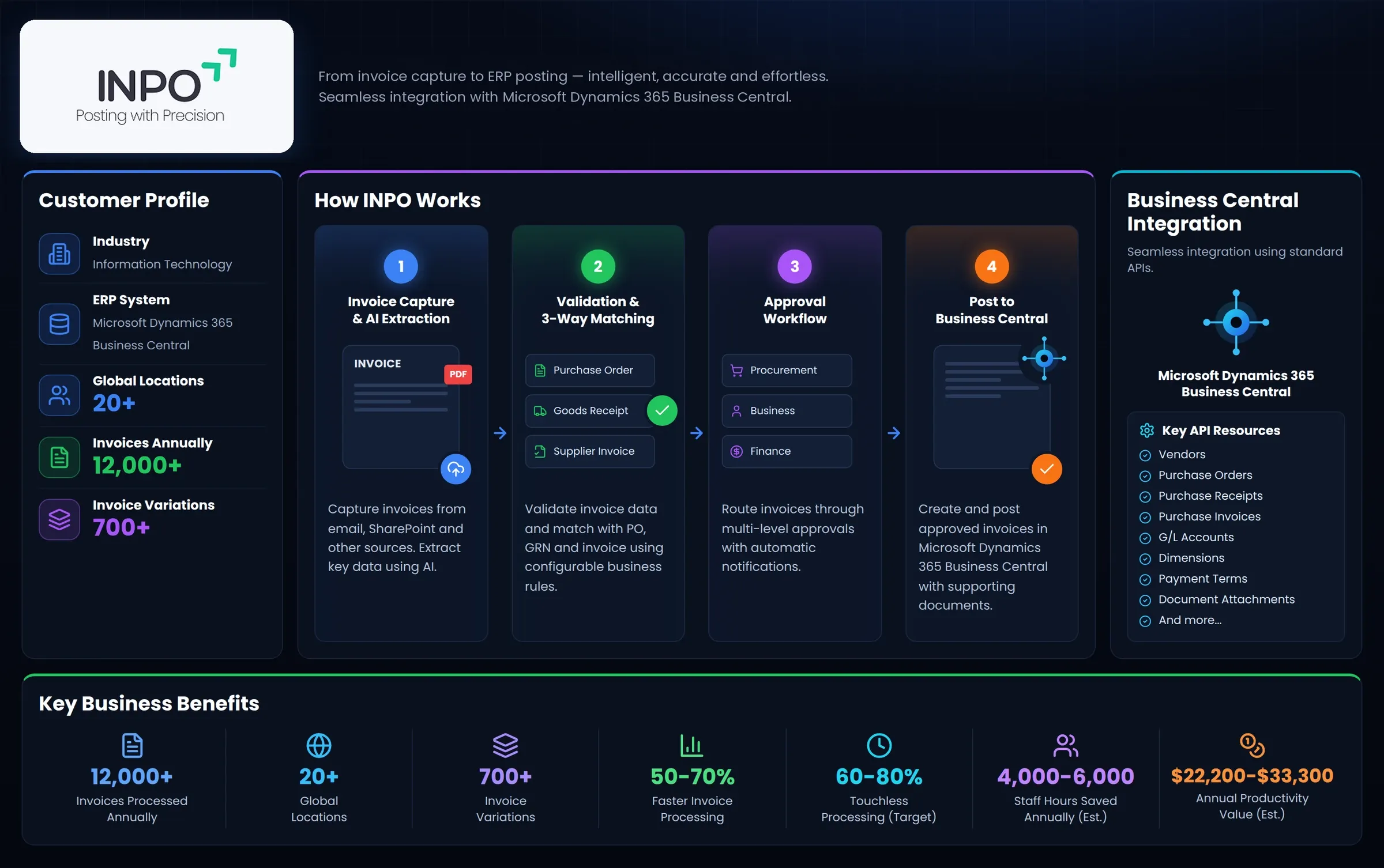
INPO case study overview: customer profile, how INPO works in 4 steps, Business Central integration and key business benefits

Customer Profile

Company
Leading Global IT Services & Systems Integration Enterprise
Industry
Information Technology
ERP System
Microsoft Dynamics 365 Business Central

12,000+
Invoices Processed Annually
20+
Global Locations
700+
Invoice Variations
13
Business Central API Resource Groups

Business Challenges

The organisation faced significant operational challenges processing 12,000+ invoices annually across 20+ global locations, involving 700+ invoice variations and complex procurement and finance workflows.

Manual Invoice Extraction & Data Entry

Invoices arrived through emails and shared folders in different formats, including PDFs and scanned documents. Finance teams manually extracted vendor details, invoice numbers, dates, PO references, tax information and line items before entering them into Business Central.

Complex PO, GRN & Invoice Reconciliation

Matching invoices against purchase orders and goods receipt notes required manual verification of quantities, prices, taxes and delivery records. Discrepancies resulted in repeated follow-ups between procurement, logistics, finance and vendors.

Fragmented Approval Workflows

Invoices required multiple approvals across procurement, business and finance teams. Email-based coordination created processing delays, limited visibility into pending approvals and increased administrative effort.

Duplicate Invoices & Limited Visibility

Different invoice formats, duplicate submissions and incomplete supporting documents increased the risk of processing errors. Management lacked centralised visibility into invoice exceptions, processing turnaround times and pending ERP postings.

Intelligent Automation Workflow

Six connected stages take every invoice from inbox to Business Central — extracted, validated, matched, approved and posted.

STEP 01

Automated Invoice Ingestion & AI Extraction

INPO continuously monitors designated email inboxes, SharePoint folders and configured document repositories to automatically capture incoming invoices. AI-powered document intelligence extracts:

  • Vendor name, invoice number and invoice date
  • Purchase order references and payment terms
  • Currency, tax details and invoice totals
  • Product descriptions, quantities and unit prices
  • Multi-page invoice line items
  • Additional configurable business fields

Supports 700+ invoice variations, converting unstructured documents into standardised, structured data for downstream validation.

STEP 02

Intelligent Validation & Data Enrichment

INPO automatically validates extracted information against Business Central master data. Key capabilities include:

  • Vendor identification and master data validation
  • Duplicate invoice detection
  • PO reference and invoice amount validation
  • GL account and cost centre enrichment
  • Tax code and tax amount verification
  • Payment terms and currency validation
  • Mandatory document checks
  • Automated exception identification

Invoices passing validation proceed to matching and approvals, while exceptions are routed for human review.

STEP 03

Automated 3-Way Matching: PO, GRN & Invoice

INPO automatically compares supplier invoices against purchase orders and goods receipt records retrieved from Business Central.

Purchase Order Matching

Validates vendor details, item codes, ordered quantities, agreed unit prices and purchase order references.

Goods Receipt Matching

Verifies goods received, receipt references and available quantities against invoice line items.

Invoice Matching

Compares invoiced quantities, unit prices, amounts and tax information against corresponding PO and receipt records.

Configurable business rules identify:
Quantity mismatches Price deviations Missing goods receipts Duplicate billing Tax discrepancies Unmatched line items Invoices exceeding approved PO values

Successfully matched invoices proceed to the configured approval or posting workflow. Exceptions are routed to procurement, logistics or finance teams for resolution.

STEP 04

Configurable Approval & Exception Management

INPO provides a centralised workflow engine to manage invoice verification, approvals and exception resolution.

  • Multi-level approvals based on invoice value, department and location
  • Procurement, business and finance approval workflows
  • Human-in-the-loop validation for AI extraction exceptions
  • Automated notifications and reminders
  • Rejection, correction and resubmission workflows
  • SLA monitoring and escalation alerts
  • Complete approval history and audit trails
  • Support for PO-based and non-PO invoices
STEP 05

Microsoft Dynamics 365 Business Central API Integration

INPO integrates with Microsoft Dynamics 365 Business Central using REST APIs and custom AL extensions where required. The integration connects invoice extraction, vendor validation, PO matching, goods receipt verification, invoice creation and ERP posting.

Business Central API Resources
API Endpoint Integration Purpose
/vendorsVendor identification and master data validation
/purchaseOrdersPurchase order retrieval and validation
/purchaseOrderLinesPurchase order line-item matching
/purchaseReceiptsPosted goods receipt retrieval
/purchaseReceiptLinesReceived quantity verification
/purchaseInvoicesPurchase invoice creation
/purchaseInvoiceLinesInvoice line-item creation
/accountsGeneral ledger account mapping
/dimensions & /dimensionValuesCost centre and department allocation
/paymentTermsPayment terms validation
/documentAttachmentsInvoice and supporting document attachments
/vendorLedgerEntriesVendor ledger and outstanding balance information
/postedPurchaseInvoicesPosted invoice status and record retrieval
Automated ERP Posting

Once an invoice successfully completes extraction, validation, 3-way matching and required approvals, INPO creates the purchase invoice and corresponding line items in Business Central. Supporting documents and approval information are associated with the relevant ERP transaction through the configured integration.

Authorised invoices can then be posted through the Business Central posting workflow or supported API action, subject to ERP validation and financial controls. Business Central remains the financial system of record, while INPO manages document intelligence, matching, approvals, exceptions and processing visibility.

Some integrations, including advanced receipt matching, localisation-specific tax fields and custom posting workflows, may require Business Central AL extensions.
STEP 06

Invoice Monitoring, Analytics & Audit Trail

INPO provides consolidated dashboards to monitor invoice processing performance across all locations.

  • Invoice volumes by vendor, location and period
  • AI extraction and validation status
  • PO and GRN matching results
  • Duplicate invoice alerts
  • Exception and rejection analysis
  • Pending approvals and SLA breaches
  • ERP posting status
  • Average invoice processing time
  • Touchless processing percentage
  • Vendor-wise processing analytics
  • Document and approval audit trails
  • AI-powered invoice search and queries

Business Benefits

Key Performance Indicator Result / Potential Improvement
Annual Invoice Processing Coverage12,000+ Invoices
Geographic Coverage20+ Global Locations
Invoice Format Coverage700+ Variations
Invoice Data Extraction Effort70–90% potential reduction
Manual PO & GRN Matching Effort60–80% potential reduction
Invoice Processing Cycle Time50–70% potential reduction
Manual ERP Data Entry70–90% potential reduction
Duplicate Invoice DetectionAutomated checks across all invoices processed
Touchless Invoice Processing60–80% potential target for eligible invoices
Estimated Annual Productivity Savings4,000–6,000 Staff Hours
Illustrative Annual Productivity Value$22,200–$33,300

Percentage improvements, touchless processing rates and productivity savings are illustrative targets, not independently verified customer results. Actual performance depends on invoice complexity, source document quality, matching rules, exception rates and approval requirements.

Illustrative Annual Productivity Savings

For an organisation processing 12,000 invoices annually:

Performance Indicator Before INPO With INPO (Illustrative)
Annual Invoice Volume12,00012,000
Average Manual Effort per Invoice30 minutes5 minutes
Annual Manual Processing Hours6,0001,000
Annual Labour Cost$33,300$5,600
Annual Hours Saved—5,000
Annual Productivity Value—$27,800
Reduction in Manual Effort—83%

Illustrative calculations use approximately $5.56 per staff hour, based on an assumed exchange rate of ₹90 per USD. Productivity value represents estimated labour capacity released, not necessarily realised cash savings. Software, implementation and maintenance costs are excluded.

Business Impact

From manual invoice processing to intelligent, ERP-connected accounts payable automation.

INPO enables the organisation to manage 12,000+ invoices annually across 20+ global locations, supporting 700+ invoice variations through a unified AI-powered platform.

By combining intelligent document extraction, automated validation, 3-way matching, configurable approval workflows and Microsoft Dynamics 365 Business Central integration, INPO reduces repetitive administrative work and improves end-to-end financial process visibility.

The solution helps organisations:
  • Improve invoice processing accuracy and consistency
  • Reduce manual data extraction and ERP entry
  • Accelerate invoice validation and approval cycles
  • Strengthen PO, GRN and invoice matching controls
  • Identify duplicate invoices and financial exceptions
  • Improve audit readiness and transaction traceability
  • Scale invoice processing without proportionately increasing administrative effort
  • Extend existing Microsoft Dynamics 365 Business Central investments without replacing the ERP

INPO | 12,000+ Invoices. 700+ Variations. 20+ Locations. Intelligent Automation.

Developed by Mavdero Techservices · Available on Microsoft Azure Marketplace

Explore INPO
Corporate Governance Automation

AI-Powered Board Resolution & Minutes Management

Transitioning multi-jurisdictional compliance from manual administrative tasks into a secure, audit-ready orchestration pipeline.

Governance Profile

Company
Innovative Motion Solutions
Industry Sector
Automotive & Medical Technology

2,200
Resolutions & Minutes
23
Global Jurisdictions
497
Active Templates
23
Statutory Forms

Business Challenges

Operating across 23 jurisdictions required the organization to manage thousands of board resolutions, meeting minutes, and statutory records while maintaining strict governance and regulatory compliance.

5–10 Day Finalization Loops

Significant turnaround time required to draft, review, approve, and finalize critical corporate decisions.

Heavy Administrative Effort

20–40 administrative hours per meeting spent on formatting, drafting, reviews, approvals, and follow-ups.

Fragmented Repositories

Manual audit preparation with fragmented documents stored across multiple isolated locations.

Template Management

Maintaining jurisdiction-specific templates and ensuring compliance across legal environments was highly time-consuming.

Collaboration Friction: Multiple email chains and disconnected approval processes made teamwork difficult, while locating historical records manually took 30–60 minutes per search.

The Board Governance Agent Workflow Solution

An automated 13-stage management lifecycle that controls corporate decisions from initial intake to secure digital archiving.

STAGE 01

Intelligent Integration

Seamlessly integrates with enterprise repositories including DMS, Shared Drives, and Microsoft SharePoint.

STAGE 02

Digital Request Management

Users submit standard requests for board, committee, and corporate resolutions through a unified interface.

STAGE 03

AI Resolution Drafting

Automatically drafts board resolutions, meeting minutes, and supporting governance documents within minutes.

STAGE 04

Smart Template Library

Manages a centralized vault of 497 templates and 23 statutory forms with smart context recommendations.

STAGE 05

Compliance Validation

Validates documents against corporate governance policies and localized region-specific regulations.

STAGE 06

Risk Identification

Proactively checks for missing approvals, policy deviations, and incomplete document layouts.

STAGE 07

Multi-Language Workspace

Supports board governance dynamics across 23 different regional settings with translation controls.

STAGE 08

Reviewer Assignment

Automatically routes files to designated directors, legal offices, and company secretaries via preset rules.

STAGE 09

Version Control Logs

Maintains complete trace logs detailing document updates, approval histories, and e-signatures.

STAGE 10

Secure Digital Archive

Locks away archived records inside a centralized data repository protected by role permissions.

STAGE 11

Semantic Search Engine

Locates active files or quarterly outputs instantly using conversational natural language searches.

STAGE 12

Retention & Disposal

Automates document shelf lifecycles, execution rules, and legal hold parameters globally.

STAGE 13

Governance Dashboards

Tracks analytics, pending tasks, workflow routing states, and general compliance targets via real-time windows.

Quantified Business Efficiency Outcomes

Performance Indicator Before vs. After Agent Integration System Optimization Context
Resolution Completion Time 5–10 days → 1–3 days Accelerates document compilation, signature aggregation, and archival cycles.
Administrative Work Effort 20–40 hours → 8–15 hours Reduces manual corporate meeting overhead requirements by over 50%.
Corporate Audit Readiness 100% Digital Audit Tracking Maintains absolute version history trails and complete traceability logs.
Search & Document Retrieval Instant Semantic Search Bypasses traditional manual database tracking to locate targets in seconds.
Template & Form Management Centralized Library Mapping Secures 497 regional layouts and 23 regulatory forms within a unified matrix.
Compliance Validation Automated Checking Systems Runs proactive anomaly identification routines to eliminate data liabilities.

Macro Business Impact

The AI-powered Board Governance Agent transformed the organization's governance operations from a manual, document-intensive process into an intelligent, digital workflow. Board Resolutions and Minutes that previously required up to 10 days are now completed within 1–3 days, while administrative effort per meeting has been reduced by more than 50%.

By automating drafting, compliance validation, reviewer routing, version control, and secure archiving, the organization established a centralized governance platform supporting 2,200 board resolutions and minutes across 23 jurisdictions. AI-powered semantic search enables instant access to historical records, while comprehensive audit trails and retention policies strengthen regulatory compliance and corporate governance.

"From Manual Governance to Intelligent Board Operations—AI that drafts, validates, routes, archives, and governs with speed, accuracy, and compliance."

VENO · Procure-to-Pay Transformation

Intelligent Vendor Management & ERP Automation

Digitising vendor onboarding, purchase order management, invoice approvals, compliance and payment reconciliation through seamless integration with Microsoft Dynamics 365 Business Central.

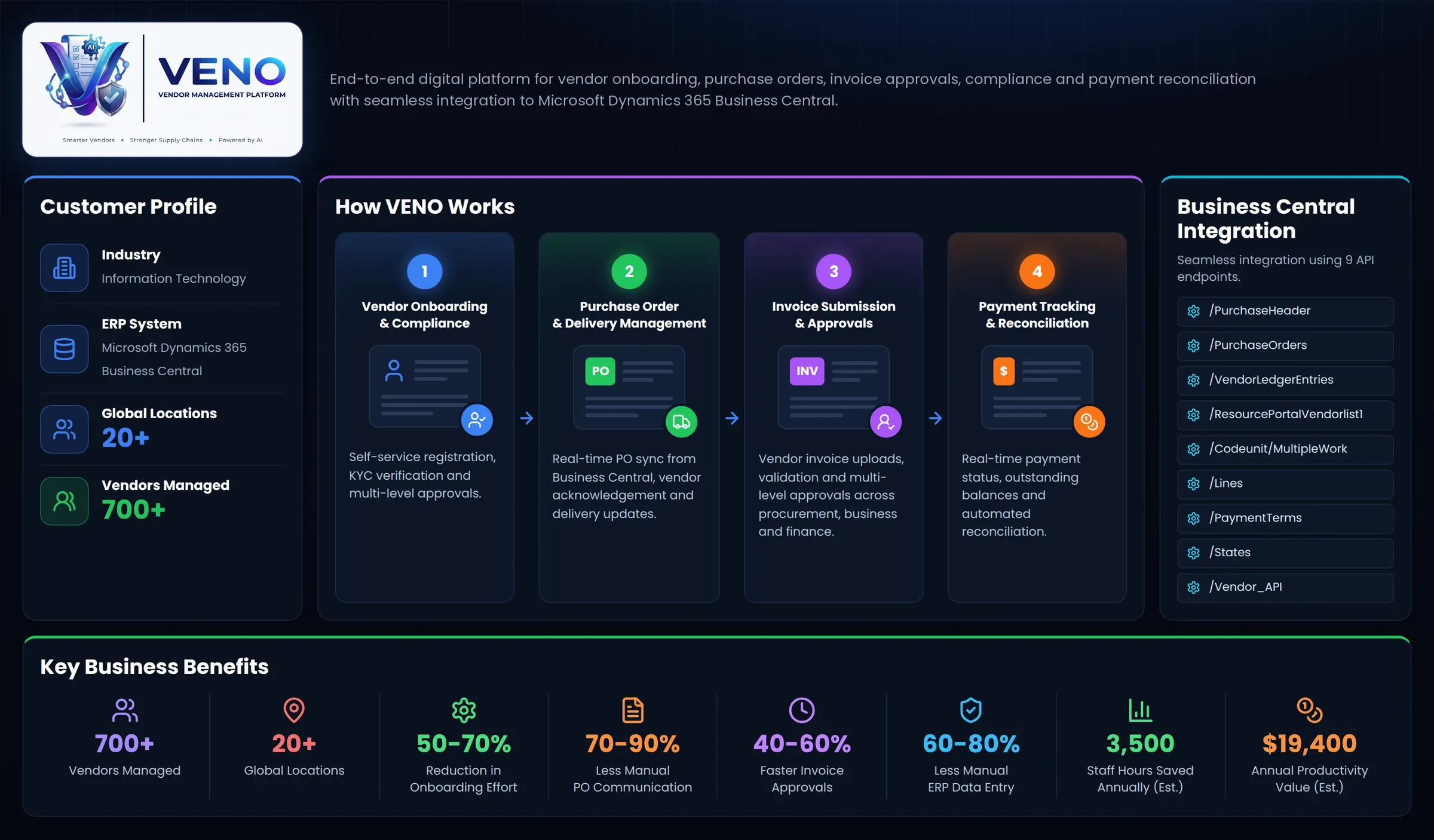
VENO case study overview: customer profile, how VENO works in 4 steps, 9 Business Central API endpoints and key business benefits

Customer Profile

Company
Leading Global IT Services & Systems Integration Enterprise
Industry
Information Technology
ERP System
Microsoft Dynamics 365 Business Central

700+
Vendors Managed
20+
Global Locations
9
Business Central API Endpoints
6
Integrated Business Workflows

Business Challenges

The organisation faced significant operational challenges managing 700+ vendors across 20+ locations, relying heavily on emails, shared folders and manual coordination between procurement, finance, logistics and vendors.

Fragmented Vendor Onboarding

Vendor registration, KYC verification, banking details and compliance documents were exchanged through emails and shared folders. Multi-level approvals required repeated follow-ups, resulting in administrative overhead and limited visibility.

Disconnected Purchase Order & Invoice Processes

Purchase orders, amendments, delivery commitments and invoice submissions were coordinated manually. Missing documents, duplicate submissions and multiple approval stages increased processing complexity and delays.

Limited Payment & Compliance Visibility

Vendors depended on emails to enquire about invoice status, outstanding payments and remittance details. Periodic GST, TDS, MSME and banking compliance activities required manual tracking and reminders.

Manual ERP Coordination

Synchronising vendor master records, purchase orders, supporting documents, invoice approvals and payment information with Business Central involved repetitive administrative work and fragmented information across departments.

Intelligent Automation Workflow

Six integrated workflows cover the full vendor lifecycle — from onboarding to payment reconciliation — connected to Business Central.

STEP 01

Digital Vendor Onboarding & Compliance

A secure self-service portal enables vendors to register, upload KYC documents, submit banking information and complete mandatory compliance requirements.

Configurable multi-level approval workflows route applications through local, regional and management teams. Approved vendor information is synchronised with Business Central, enabling vendor code creation and automated registration notifications.

The platform also supports parent vendor mapping, periodic document collection, banking verification and MSME declaration reminders.

STEP 02

Purchase Order & Delivery Management

Approved purchase orders are automatically synchronised from Business Central to the vendor portal at configured one-minute intervals.

Vendors can view purchase orders, acknowledge requirements, update item-level Expected Delivery Dates (EDD) and receive amendment notifications.

Automated alerts identify overdue delivery commitments, while configurable workflows manage advance payment approvals involving Procurement, Finance, CFO and Banking teams.

STEP 03

Invoice Submission & Multi-Level Approvals

Vendors upload invoices and supporting documents directly against open purchase orders, with support for non-PO expenses.

Automated checks validate mandatory documents, identify duplicate submissions and enforce configurable invoice submission rules. Invoices move through structured approval workflows involving Purchase, Business, Logistics and Finance teams.

Rejections, comments, resubmissions, pending approvals and daily reminders are managed through automated notifications, providing complete workflow traceability.

STEP 04

Microsoft Dynamics 365 Business Central API Integration

VENO integrates with Microsoft Dynamics 365 Business Central through 9 API endpoints, connecting vendor management, procurement, invoice processing and financial information.

Integrated API Endpoints
API Endpoint Integration Area
/PurchaseHeaderPurchase order header information
/PurchaseOrdersPurchase order synchronisation
/VendorLedgerEntriesVendor ledger and outstanding balances
/ResourcePortalVendorlist1Vendor information exchange
/Codeunit/MultipleWorkCustom ERP processing operations
/LinesPurchase order line details
/PaymentTermsPayment terms information
/StatesState reference information
/Vendor_APIVendor master data integration

The integration enables automated data exchange, reduces duplicate data entry and provides consistency between the vendor portal and Business Central. Business Central remains the financial system of record, while VENO manages vendor collaboration, document submission, approvals and operational visibility.

STEP 05

Payment Tracking & Vendor Reconciliation

Vendors gain self-service visibility into invoice processing status, outstanding balances and payment information. Payment status and UTR references are synchronised from Business Central and displayed against the corresponding invoices.

Quarterly vendor statement submission, outstanding balance tracking and reconciliation workflows help reduce payment enquiries and manual coordination between vendors and finance teams.

STEP 06

Agreement, Tax Compliance & Management Dashboards

VENO centralises vendor agreements, digital approvals, electronic signatures and signed document storage. Automated compliance workflows manage GST discrepancy notifications, TDS certificate distribution, MSME declarations, banking confirmations and periodic document renewals.

Consolidated dashboards provide visibility into vendor onboarding, open purchase orders, overdue deliveries, pending invoices, approval bottlenecks, outstanding payments and compliance status.

Platform Architecture

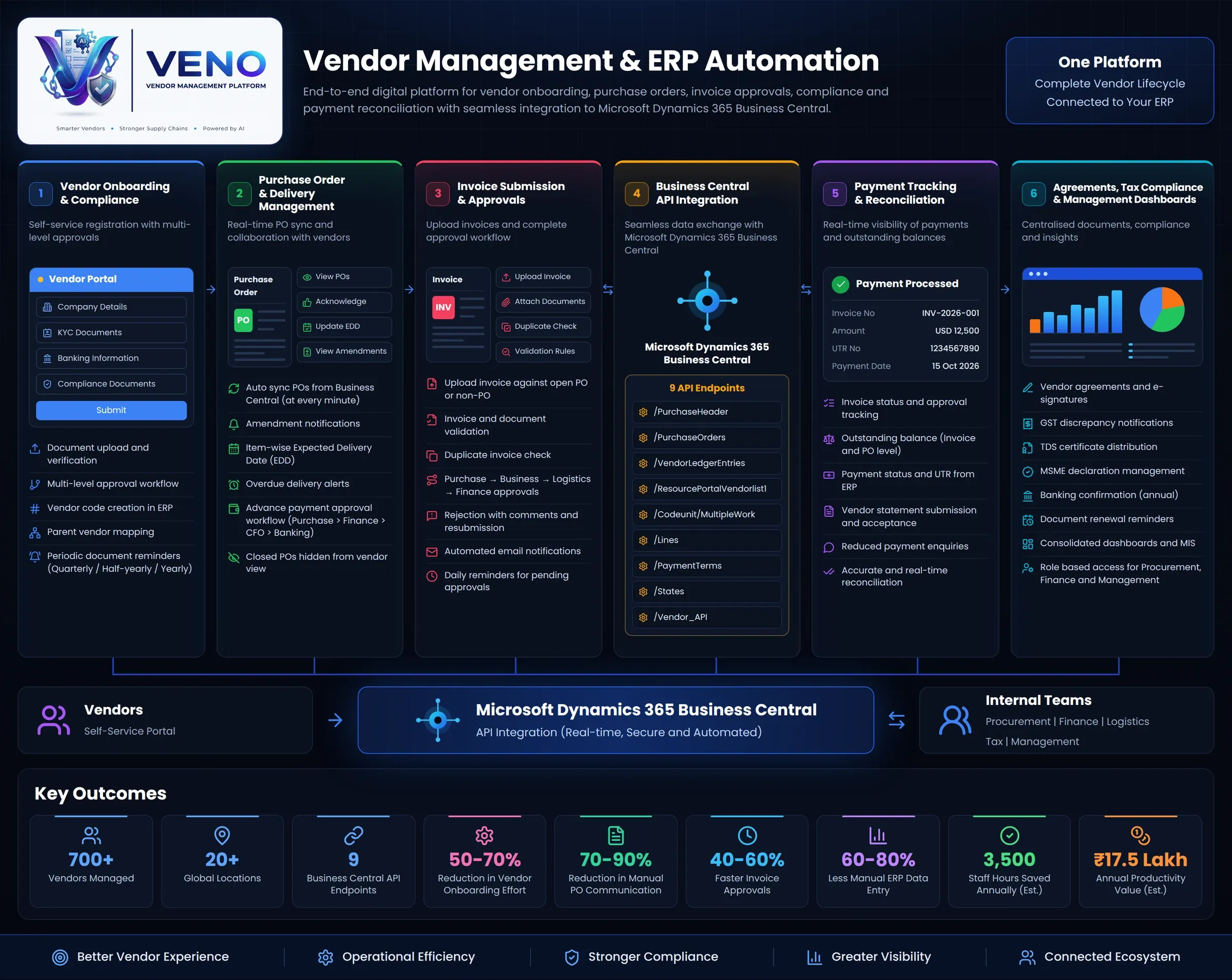
One platform for the complete vendor lifecycle — vendors, internal teams and Business Central connected in real time.

VENO platform architecture: six workflow modules from vendor onboarding to management dashboards, connected to Microsoft Dynamics 365 Business Central through 9 API endpoints, with key outcomes

Business Benefits

Key Performance Indicator Result / Potential Improvement
Vendor Management Coverage700+ Vendors
Geographic Coverage20+ Locations
ERP Integration9 API Endpoints
Vendor Onboarding Effort50–70% potential reduction
Manual PO Communication70–90% potential reduction
Invoice Approval Coordination40–60% potential reduction
Manual ERP Data Re-entry60–80% potential reduction
Vendor Follow-up Emails50–70% potential reduction
Compliance Follow-up Effort60–80% potential reduction
Estimated Annual Productivity Savings3,500 Staff Hours
Illustrative Annual Productivity Value₹17.5 Lakh

The percentage improvements and productivity savings are illustrative estimates based on potential workflow efficiencies. They are not presented as independently verified customer results.

Business Impact

From fragmented manual processes to a connected digital vendor ecosystem.

VENO enables the organisation to manage its vendor lifecycle through a unified platform, connecting 700+ vendors across 20+ locations with Microsoft Dynamics 365 Business Central.

By digitising onboarding, procurement collaboration, invoice approvals, compliance monitoring and payment visibility, the platform reduces reliance on emails and shared folders while improving operational transparency and process control.

The solution demonstrates how enterprises can extend their existing ERP investments with intelligent vendor management automation without replacing their core financial systems.

VENO | One Platform. 700+ Vendors. 20+ Locations. Complete Visibility.

Developed by Mavdero Techservices · Available on Microsoft Azure Marketplace

Explore VENO
Ready to write your success story?

Join hundreds of organizations that have transformed their operations with
Mavdero.